
Benefits administration, connected to your team.
Coordinate enrollment, eligibility changes, billing and employee questions with SSGI Benefits. Your service team and SSGI One keep requests, responsibilities and next steps together.
- Enrollment
- Eligibility and billing
- Employee support
See who does what, and what comes next.
Choose a new hire, billing issue or renewal to see how your team, SSGI and the carrier work together.
A new colleague. A clear enrollment path.

Connected work. Clear responsibilities.
Your team
SSGI
Benefits partners
You provide
Tell your SSGI contact about the hire and timing through the appropriate secure channel.
SSGI coordinates
We help confirm the enrollment steps and coordinate with the relevant carrier or administrator.
Your next step
Your team receives the next action and any outstanding requirements. The carrier or administrator confirms coverage and effective dates.
An example of how coordination works. Nothing is submitted or stored, and no live account information is shown.
See the full coordination model
How the work moves through SSGI
Operating layerEmployer & employee
- New hires & terminations
- Eligibility & enrollment
- Questions & changes
- Invoice reviews
Coordination layer
- Routes the request
- Coordinates follow-up
- Tracks activity
- Reports back to you
Carrier / payroll / TPA
- Carriers of record
- Payroll vendors
- Third-party administrators
- Plan documents & SPDs
SSGI sits between your team and the systems that hold the records — routing work, coordinating follow-up, and keeping you informed.
Seven areas your SSGI team coordinates.
Agree the scope, responsibilities and review cadence with your SSGI contact. Carrier and vendor actions remain subject to their processes.
People & enrollment
Onboarding
New-hire benefits orientation, enrollment windows, and the paperwork that has to land on time.
Eligibility & enrollment
Tracking eligibility rules, qualifying life events, and open enrollment — and keeping activity current.
Hires & terminations
Adding and removing employees from plans, coordinating COBRA where applicable, and closing out coverage cleanly.
Carrier & billing
Carrier & vendor coordination
We act as the point of contact between you and your carriers and TPAs so issues get routed and resolved.
Billing discrepancy support
Reviewing billing discrepancies and coordinating follow-up with carriers, according to your agreed service scope.
Communication & records
Employee communication
Plan summaries, change announcements, and one-on-one support when employees have questions.
Documents & records
Keeping plan documents, SPDs, and enrollment records organized and accessible for audits and reviews.
Your benefits work. One shared place to move it forward.
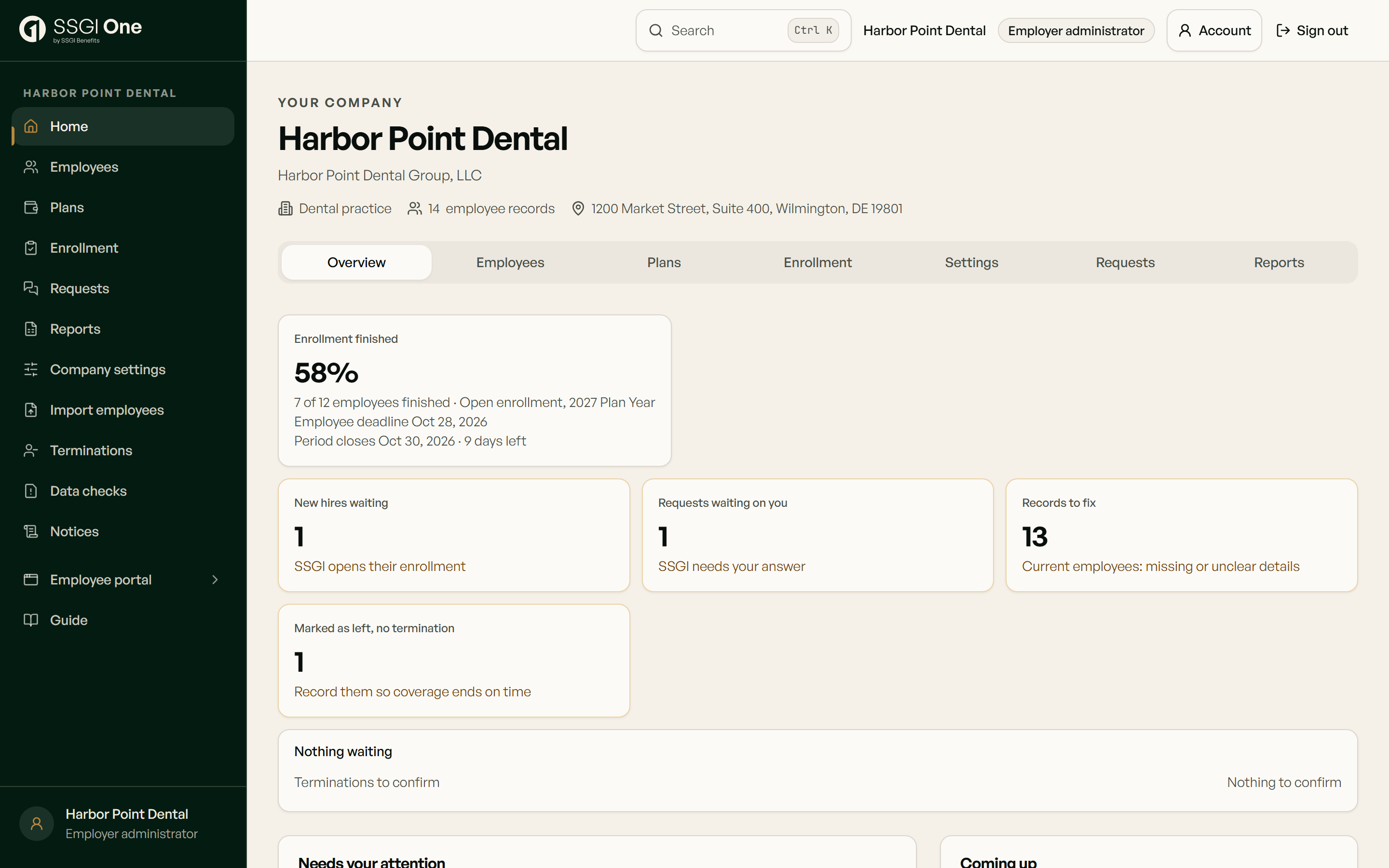
Your employer workspace brings enrollment progress, employee records and requests into view. Employees use the same platform to enroll, ask for help and follow their next steps. Your SSGI team works alongside you.

See what needs attention
Track enrollment progress and identify the next action for your team.
Keep the request together
Send a question or document to SSGI and follow status and replies in the portal.
Give employees a clear next step
Explore group-benefit and ICHRA workflows in the benefits platform.
Benefits administration with SSGI One
See how new hires, changes, enrollment windows and reports are handled in one workspace.
Shown with sample data.
Open video in new tabView a sample employer workspace
What you should know
- Benefits administration support covers enrollment, eligibility, billing, carrier coordination, employee questions, and renewals.
- The service is designed to reduce HR workload.
SSGI coordinates benefits administration on your behalf — routing work, tracking its status, and keeping you informed. When you're preparing for annual enrollment, our Open Enrollment Readiness Center offers an educational walkthrough of the timing and communications ahead. If you're implementing a new or changed benefit, our Benefits Implementation & Client Onboarding Center walks through the readiness, critical path, and responsibilities before any system work begins.
Direct answers before the first conversation
Understand your options and the responsibilities behind each decision.
Employee benefits guidance for national and regional employers
Find guidance for your work locations, from group health insurance to renewal and enrollment.
- East Coast employee benefitsMulti-state benefits guidance across SSGI's licensed East Coast jurisdictions.
- Mid-Atlantic employee benefitsRegional guidance for multi-state employers.
- Maryland employee benefitsStatewide hub for Maryland county and city markets.
- Pennsylvania employee benefitsState hub for Pennsylvania employer and local-market guidance.
- Delaware employee benefitsState hub for Delaware employer and county guidance.
- Virginia employee benefitsState hub with focused Northern Virginia guidance.
- Washington DC employee benefitsDistrict-specific employee benefits guidance.
- New Jersey employee benefitsStatewide carrier, network, funding, and administration guidance.
SSGI serves employers across its licensed states. Coverage options, carrier rules, and recommendations depend on the employer, workforce, jurisdiction, and current market.
Verify employer responsibilities at the source
These federal resources provide authoritative background. They do not replace employer-specific legal, tax, plan, carrier, or administrator guidance.
Sources
- U.S. Department of Labor — Health PlansOfficial EBSA health-plan administration and compliance resources.
- U.S. Department of Labor — Reporting and Disclosure GuideOfficial guide to common employee-benefit reporting and disclosure responsibilities.
- U.S. Department of Labor — Employer's Guide to COBRAOfficial employer guide to federal group-health continuation coverage.
Guidance
SSGI coordinates benefits administration and provides SSGI One for enrollment and service workflows. Carrier coverage decisions, authoritative plan documents, payroll records and legal obligations remain with the responsible parties. SSGI is not a carrier, TPA, legal counsel or compliance guarantor.
Want to offload the admin work?
Tell us what's eating your team's time and we'll show you exactly what we can take on — and what stays with your systems.